Chemical inventory for research teams

Find your samples.
Know what’s left.

Find a compound, locate its samples, and see how much is left. Molhaven connects structures, storage, purchases, and projects in one laboratory workspace. We help you bring your existing data in.

30-day trial · No credit card · Setup help included

Managing samples made in a synthesis lab? See our chemical inventory workflow for synthesis labs.

molhaven / inventory Inventory overview
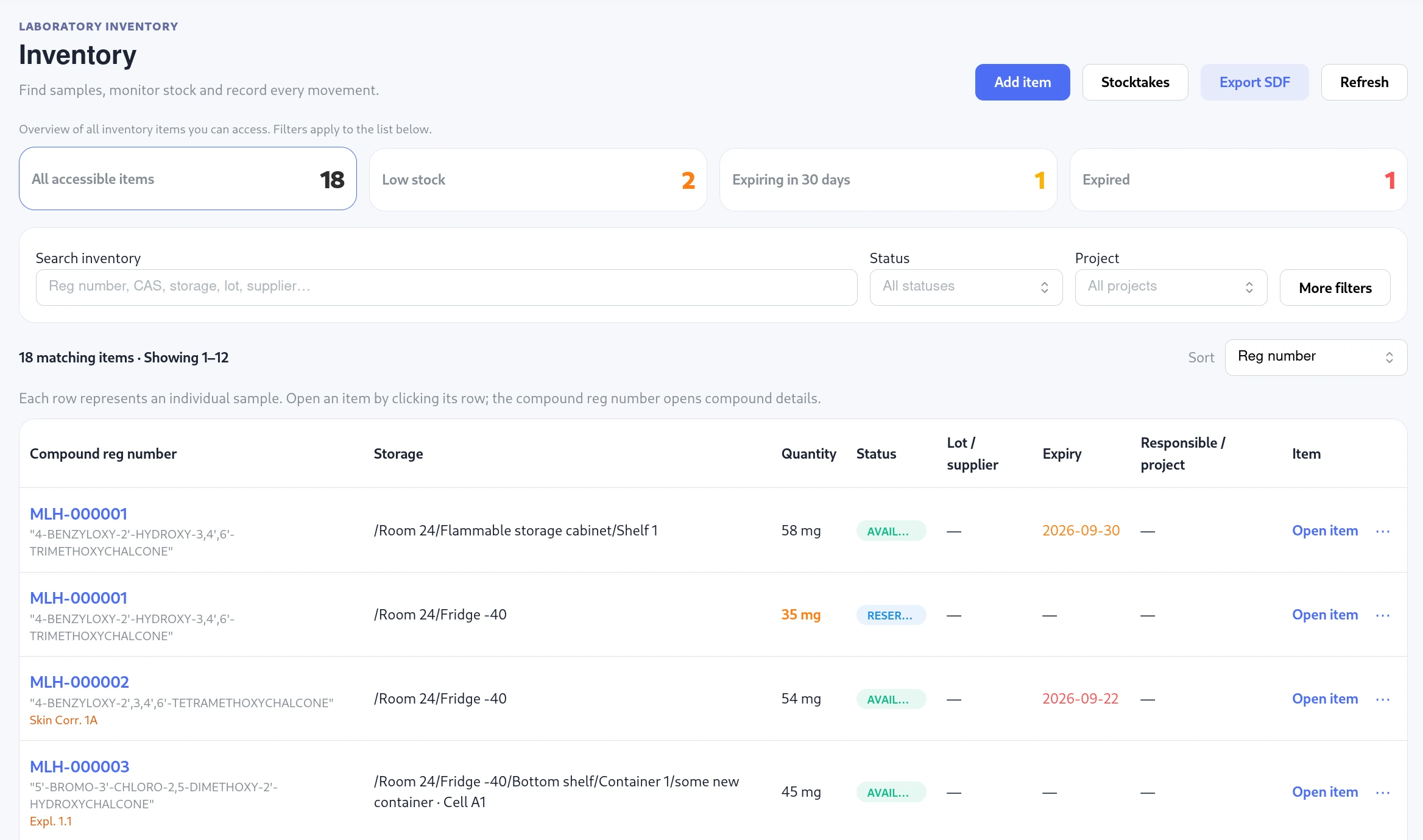
Molhaven inventory with stock alerts, search and project filters, storage paths, and sample records

Assisted onboarding

Bring your existing data. We’ll help set up the lab.

You do not need to reorganise years of spreadsheets before getting started. Create a laboratory, upload your existing files, and our team will help prepare the compounds, sample records, and storage locations with you.

  1. 01 / SHARE

    Send the files you already use.

    Upload the CSV, Excel, SDF, or supporting files you already use. We review the request personally and discuss how your lab stores and tracks its samples.

  2. 02 / PREPARE

    Shape the workspace together.

    We help separate compound records from physical samples, map your storage tree and containers, and organise projects and team access.

  3. 03 / WORK

    Start with records your team can use.

    Review the prepared data with us, then manage stock, run inventory checks, print QR labels, and follow changes in Molhaven.

Already have an SDF file? You can also map and validate it yourself before importing.

01Compound registry
02Inventory & storage
03Purchases & projects
04Stocktakes & reports

What you can do

From a structure to the sample on your shelf.

Keep chemical identity, physical stock, and everyday laboratory work connected.

01 / Compound library

Find the chemistry. Open the sample.

Search by name, registration number, or SMILES. Draw a structure for exact, substructure, or similarity search. A quick preview leads to the full compound record and its physical samples.

Keep CAS and DOI identifiers, tags, CLP hazards, and supporting documents with the compound.

See how it works
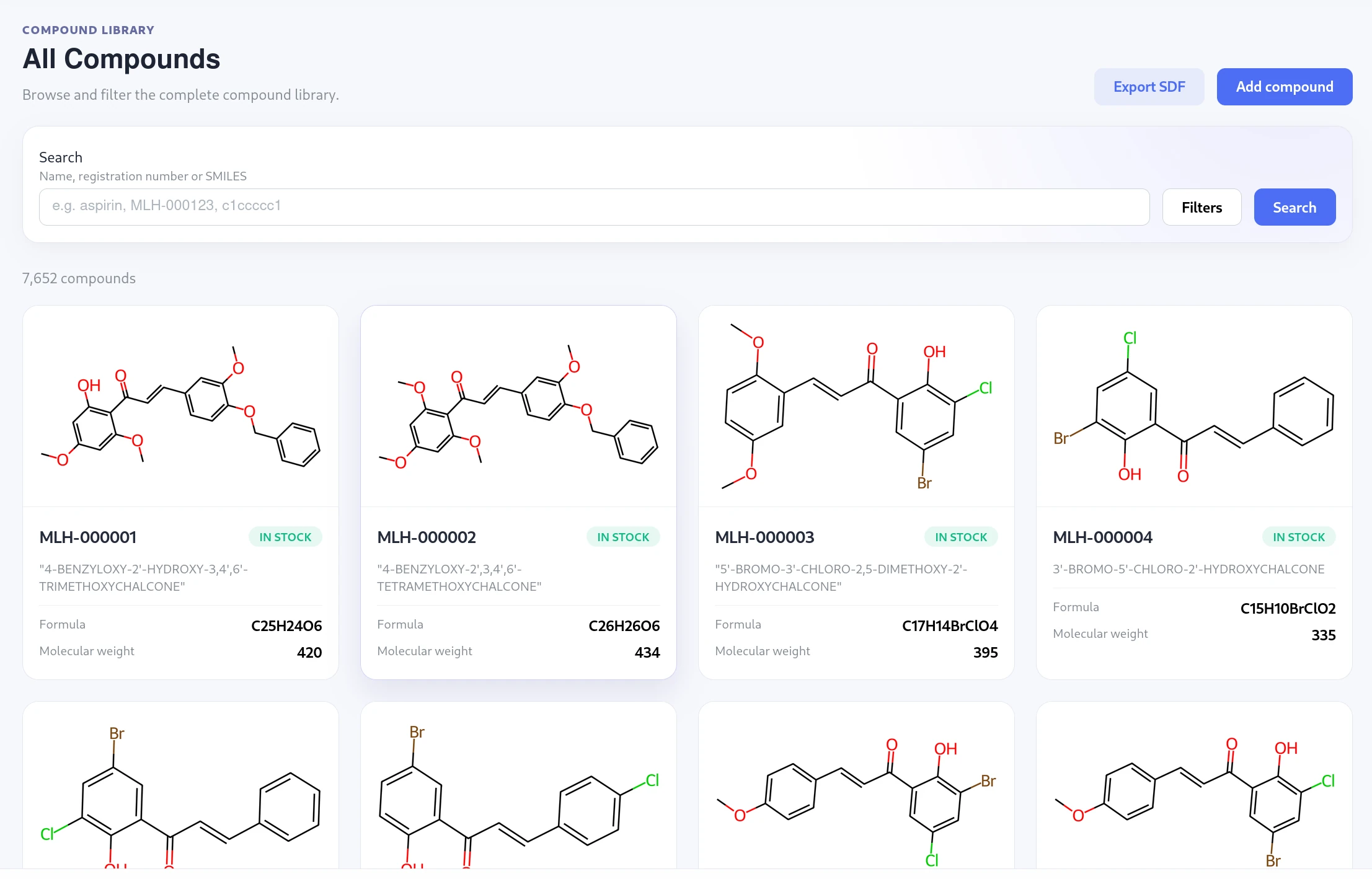
A searchable compound catalogue with structure cards and stock status
Browse structures and see which compounds have stock.
02 / Inventory & storage

See what you have and where it lives.

Filter samples by compound, location, status, project, supplier, or expiry. Open an item to record consumption, move it, update its details, or dispose of it. Its history keeps those changes together.

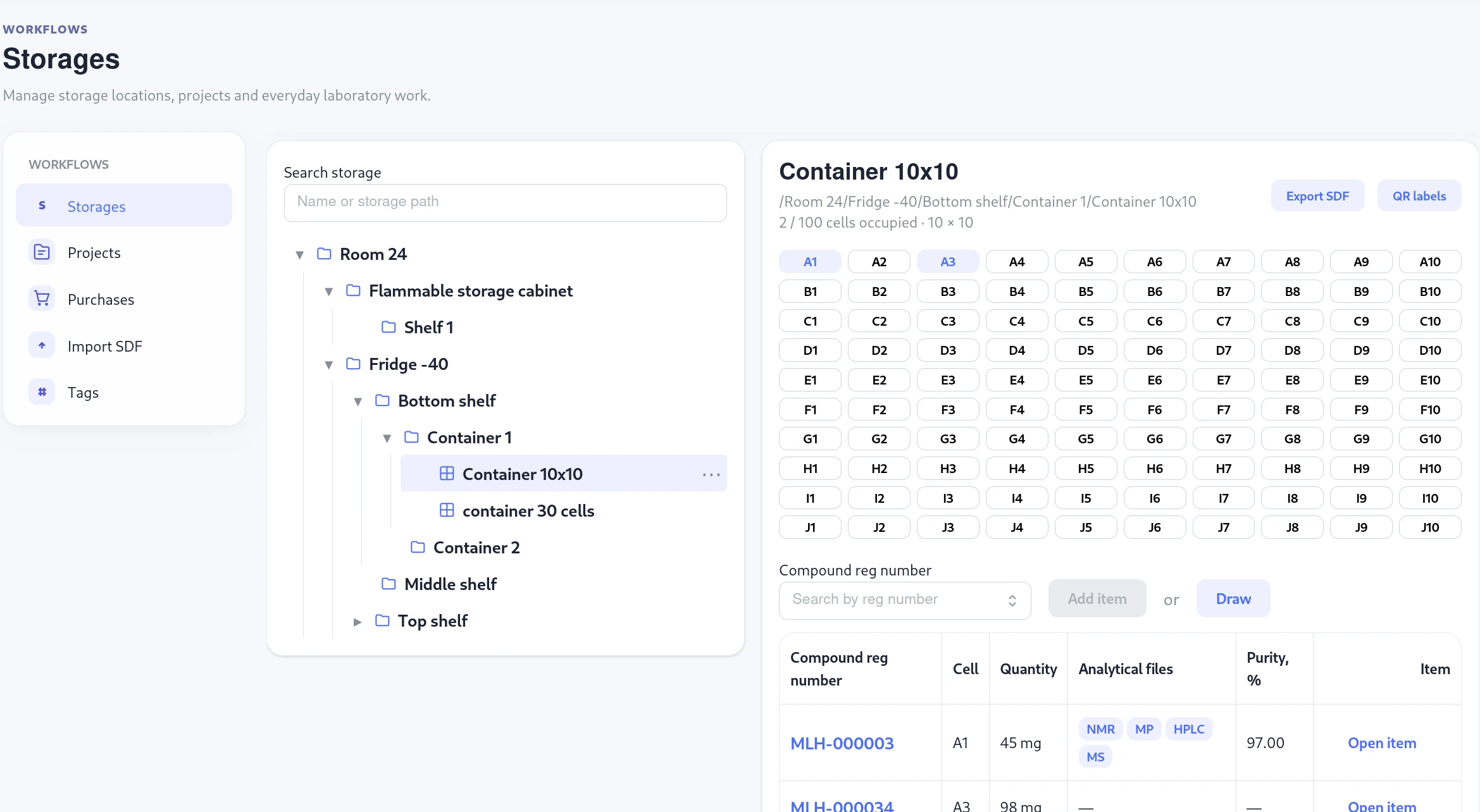
Build a storage tree that matches your lab. Use ordinary locations for multiple items, or containers with one item per cell. Print QR labels and export filtered inventory to SDF.

See how it works
A nested storage tree and a 10 by 10 container with occupied cells
Find a location in the tree, then see its samples or container cells.
03 / Purchases

Follow a reagent from request to shelf.

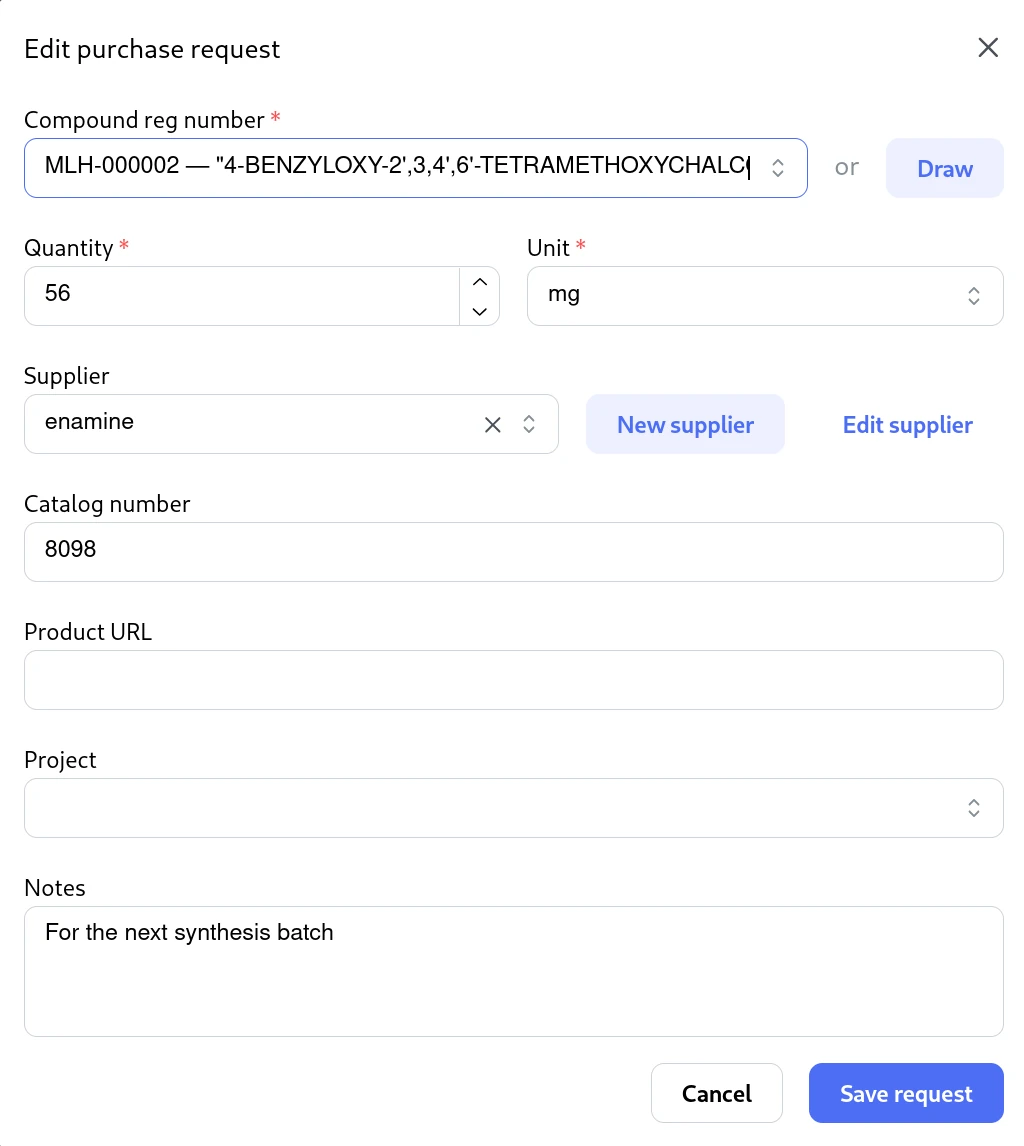
Request an existing compound by reg number or draw a new one. Choose a supplier, quantity, and project. Members with purchase editing access can approve or reject the request.

When a delivery arrives, receive all or part of it and split the stock between storage locations or cells. Each placement creates an inventory item linked to the receipt.

See how it works
A reagent purchase request with compound selection, supplier, quantity and notes
Choose the compound and supplier in the same request.
04 / Projects

Keep the samples and documents for a project together.

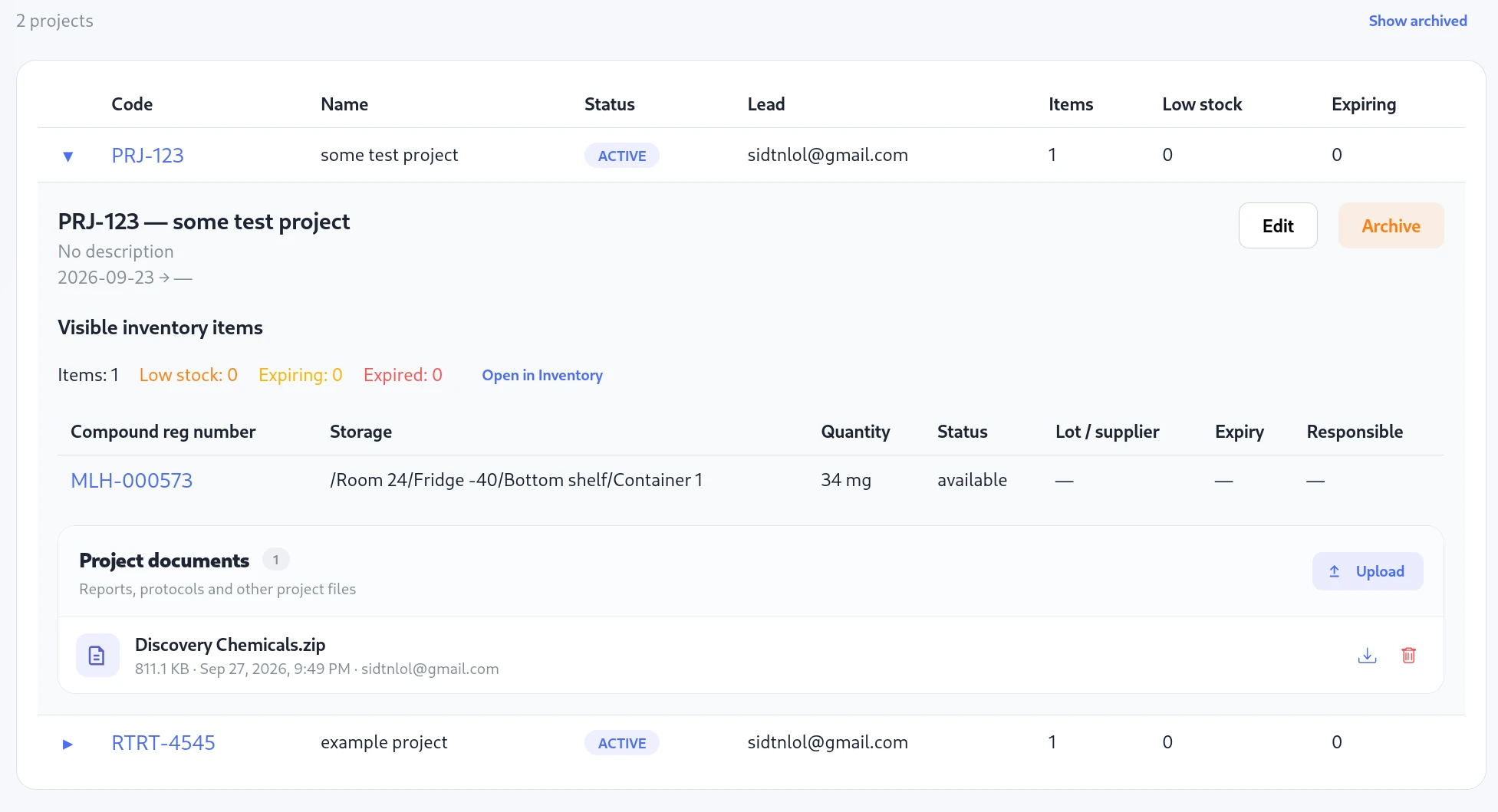
Give a project a code, lead, status, and dates. Expand it to see its inventory and stock alerts, attach protocols or reports, and open its items in a filtered Inventory view.

The same storage permissions apply to project items, so adding an item to a project does not widen access.

See how it works
An expanded project with linked inventory items and project documents
Review project stock and documents without leaving the list.
05 / Stocktakes & reports

Check the shelves. Keep the team informed.

Run a stocktake for the lab or a storage subtree. Scan sample QR labels, record discrepancies, and review them before applying corrections. Export the findings to CSV.

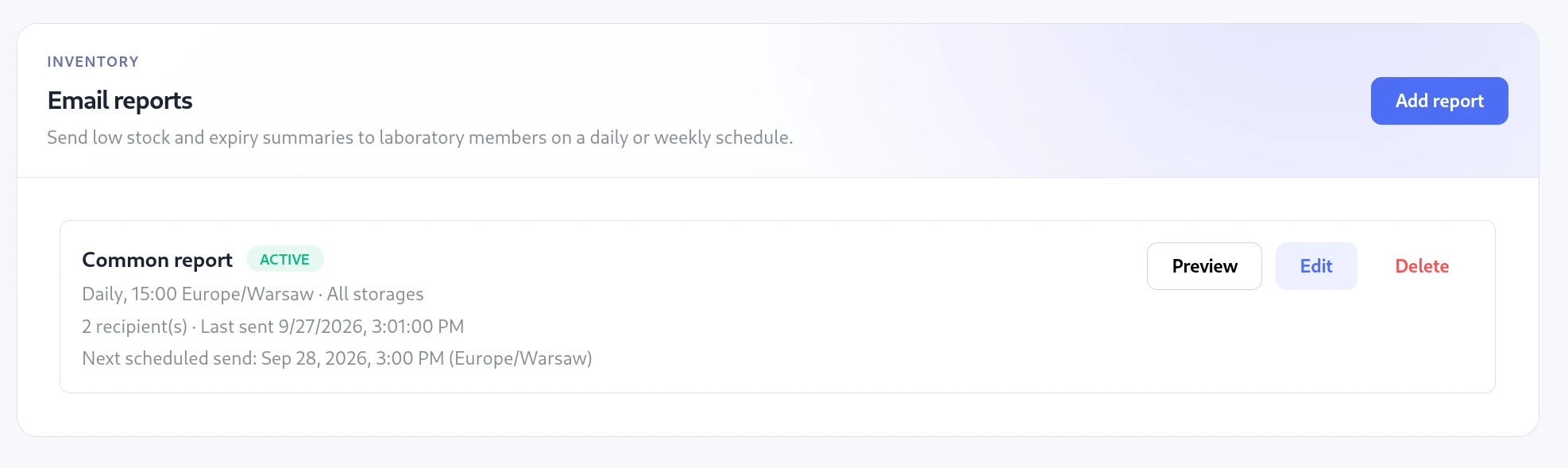
Schedule daily or weekly email reports for low stock and expiry. Filter by storage or project, include purchase requests, and preview a recipient’s report before sending.

See how it works
Scheduled inventory reports showing recipients, next send time and a preview action
Report previews and deliveries use each recipient’s current access.

Security and infrastructure

Built with your data in mind.

Molhaven's production application infrastructure runs on AWS in Frankfurt, Germany (eu-central-1). Protecting laboratory and user data has been a priority throughout the application's design and development.

PRIVATE WORKSPACES

Keep laboratory records separate.

Compounds, inventory, documents, and access roles are scoped to the active laboratory.

PERMISSIONS

Give access where it belongs.

Assign roles globally or to a storage node and its descendants. Permissions apply to the linked items.

ACCOUNTABILITY

Keep a reliable record.

Track item movements and important changes in audit history. Back up and restore the laboratory storage tree.

Simple pricing per laboratory

Start small. Keep every core feature.

Plans differ by capacity. Every paid laboratory includes compound search, inventory, purchasing, projects, stocktakes, email reports, QR labels, SDF import and export, permissions, and backups.

Free trial

Try Molhaven with your own data.

€0for 30 days

No card required. We will help you create your laboratory workspace and migrate your existing data at no cost.

  • Up to 5 users
  • 10,000 compounds
  • 1 GB file storage
  • All product features
  • Free setup and migration help
Start free trial

Lab Pro

More room for established teams.

€99per lab / month

€990 billed annually, with larger limits and priority support.

  • Up to 30 users
  • 250,000 compounds
  • 50 GB file storage
  • Priority email support
Talk to us

Prices are in EUR. Taxes may apply. Paid subscriptions will become available with the production launch.

Enterprise and self-hosted

Need a dedicated environment?

Molhaven Cloud is the fastest way to start. Organisations with stricter infrastructure or intellectual-property requirements can choose a dedicated deployment or run Molhaven in their own AWS account.

  • Dedicated cloud or customer-managed AWS
  • Custom limits, onboarding, and migration assistance
  • Perpetual self-hosted licensing with optional maintenance

Dedicated rollout

Setup help extends to your own environment.

For a dedicated deployment, we help plan the environment, initial data transfer, and your team’s first workflow.

  • Environment and access planning
  • CSV, Excel, and SDF data mapping
  • Team onboarding session

Questions about setup or deployment?

Let’s find the right setup for your lab.

Tell us about your team, compound collection, storage model, or deployment requirements. We provide free help creating your lab workspace and preparing existing CSV, Excel, or SDF data, and can arrange a focused product walkthrough.

support@molhaven.com